


Keep the plan current.
Autosave, reminders, and dashboard progress make ordinary upkeep feel manageable instead of like a once-a-year admin project.
A private desktop vault for the details your family may need.
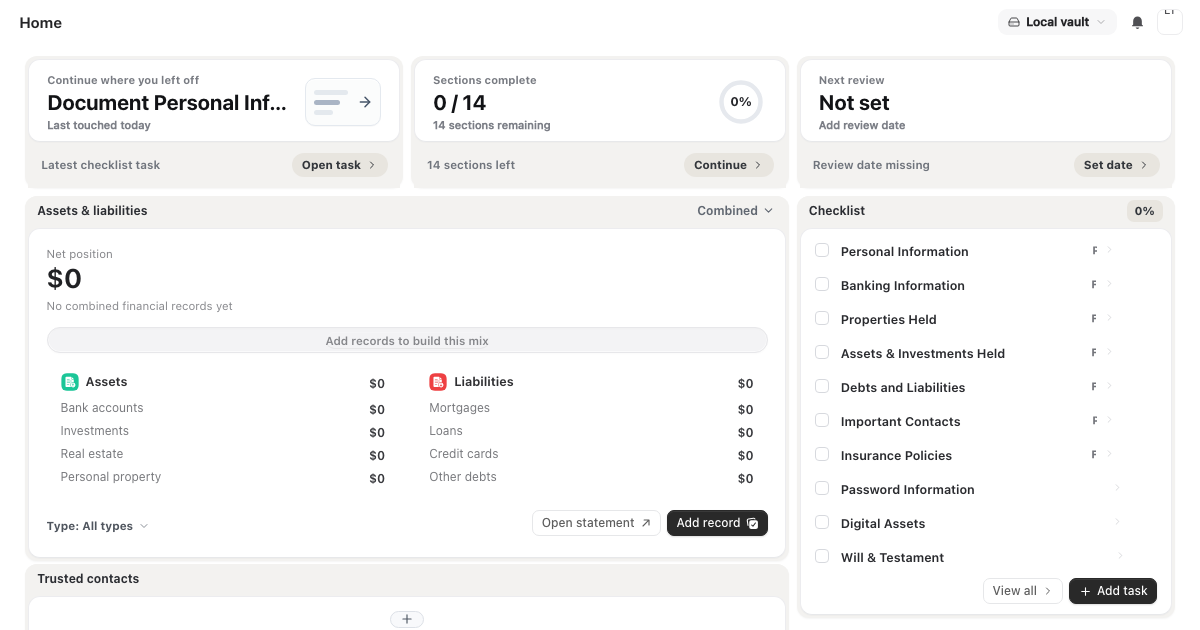
Start with essentials, attach the proof, then give people a clear path when they need it.
A single progress view shows what is already documented and which important details still need a pass.
Keep assets, liabilities, accounts, and policies readable from one dashboard view.
| Assets | $2,197,300 |
|---|---|
| Real property | $2,100,000 |
| Bank accounts | $92,300 |
| Business interests | $5,000 |
| Liabilities | $482,680 |
|---|---|
| Mortgage | $480,000 |
| Credit card | $2,680 |
Keep important files beside the instructions and profile answers they support.
Reminders and dashboard progress keep upkeep from becoming a once-a-year admin job.
Review the policy file and linked contact before it expires.
Your vault starts locally. Sync and sharing only move encrypted copies when you choose to use them.
Legacy Toolkit keeps the primary vault local and encrypted, then lets you opt into cloud sync and sharing without turning the server into the source of truth for your private data.
Read the security modelAutosave, reminders, and dashboard progress make ordinary upkeep feel manageable instead of like a once-a-year admin project.
Shared sections and document context give people clear instructions without handing over the whole vault.
A short version of what the app stores, how it protects it, and how sharing works.
It gives families and business owners one trusted playbook so loved ones are not left guessing. Contacts, account references, documents, instructions, and key decisions live in one organized vault.
Legacy Toolkit is built for the information that rarely fits neatly into a will, trust, password manager, or shared drive. Families may need financial account references, insurance details, medical contacts, device notes, business records, property information, subscription lists, and personal wishes. The hard part is not only saving those details. The hard part is keeping them understandable, current, and protected.
The homepage promise is literal: your accounts, documents, and wishes stay together in one organized plan, and the plan stays protected by a local-first encrypted vault. Guided profile sections, encrypted storage, and controlled sharing do the quieter work below the hero: you can attach documents beside the records they explain, record who should be contacted, add reminders for information that expires, and prepare trusted access without sending the whole vault to everyone by default.
A useful digital legacy plan should be readable by someone who is under pressure. Legacy Toolkit keeps the structure plain: profile sections for the core record, document storage for supporting files, reminders for upkeep, and sharing controls for the people who may need selected context. That structure helps turn private information into a practical handoff without making it public.
The same structure also helps while nothing is urgent. You can review accounts after a bank change, update documents after a policy renewal, add wishes after a family conversation, and keep protected notes close to the records they explain. Small updates make the plan more reliable than a large folder that is created once and forgotten.
This is why the product focuses on secure digital legacy management instead of simple file storage. The plan has to explain what exists, where supporting documents live, which instructions matter, and who should receive selected access. When those pieces stay connected over time, a trusted person can act from context rather than guessing from scattered files.
That context is the difference between stored information and a plan someone can use.
For deeper planning work, continue with the plain guides for digital legacy planning, estate planning organizers, executor checklists, and encrypted document vaults.
Review dates, renewal reminders, document context, and trusted access decisions keep the plan useful as accounts, providers, devices, advisors, and family responsibilities change.
Download the desktop app and build the private plan your family can rely on.
Compare installers and release channelsWindows 10+ and macOS 10.14+.